Tibo:Auto-review 免费且不消耗套餐额度
第 2.1 天/
我们已将 Auto-review 功能免费提供给所有通过 ChatGPT 账户登录的用户。您可以在设置 > 权限 > 自动审核中启用它。Auto-review 改进了默认沙盒设置,后者要求您批准所有内容,除非您花费大量时间配置特定规则,否则容易导致决策疲劳。
它允许您运行长时间任务,同时由第二个代理审核主代理执行的所有操作。其唯一目标是防止采取高风险操作,并防范不符合原始用户意图的不想要的操作。此 Auto-review 功能现已免费,且不会消耗您的计划使用量。
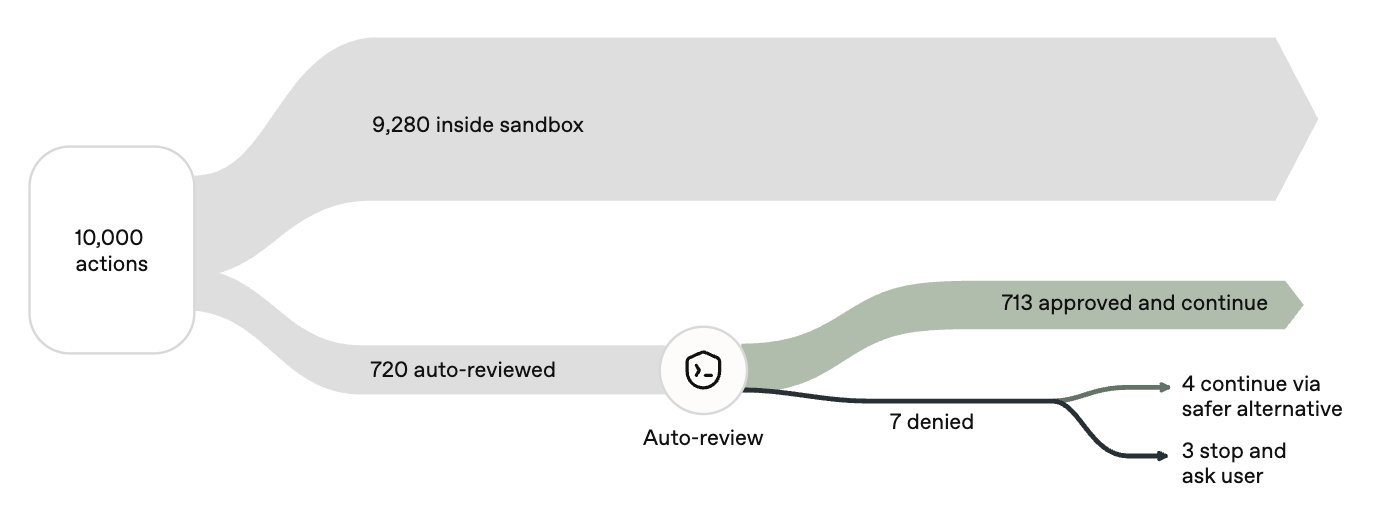
您可以在这里阅读有关此功能的信息:https://alignment.openai.com/auto-review/
使用自动审查而不是完全访问。不再是权衡取舍,你将睡得更安稳
自动审核是“为我批准”的权限模式。要使用它,请打开输入框下方的权限菜单并选择“为我批准”。
对照原文
Day 2.1/ We have made Auto-review free for all users signed in through a ChatGPT account. You can enable it in settings > permissions > auto-review. Auto-review improves upon the default sandbox setting that requires you to approve everything, which is prone to decision fatigue unless you spend a lot of time configuring specific rules. It allows you to run long tasks while having a second agent review all actions taken by the primary agent. Its only goal is to prevent high-risk actions from being taken and to protect against unwanted actions that are not aligned with the original user intent. This Auto-review feature is now free and does not draw usage from your plan.
You can read about the feature here: https://t.co/bbJM07iNtf
Use auto-review instead of full-access. Not a trade-off anymore and you'll sleep more peacefully
Auto-review is the “Approve for me” permission mode. To use it, open the permissions menu below the composer and select “Approve for me”.